


COVID-19
COVID-19: is the name given by the World Health Organization (WHO) on February 11, 2020 for the disease caused by the novel coronavirus SARS-CoV-2. It started in Wuhan, China in late 2019 and has since spread worldwide. COVID-19 is an acronym that stands for coronavirus disease of 2019.What does COVID-19 mean?
COVID-19 is the name of the disease caused by the SARS-CoV-2 virus. Viruses and the diseases they cause have different names. For example, AIDS is the disease caused by the human immunodeficiency virus, HIV.
Who named COVID-19?
The coronavirus disease of 2019 was named COVID-19 by the WHO in a press release on February 11, 2020.
When was the coronavirus given the “COVID-19” name?
On December 31, 2019, a strange new pneumonia of unknown cause was reported to the Chinese WHO Country Office. A cluster of these cases had appeared in Wuhan, a city in the Hubei Province of China. These infections were found to be caused by a new coronavirus which was given the name “2019 novel coronavirus” (2019-nCoV).
Why was the coronavirus renamed to COVID-19?
The WHO press release of February 11 explained why a name was needed for this new disease: “to enable discussion on disease prevention, spread, transmissibility, severity, and treatment.”
Diseases are officially named by WHO in the International Classification of Diseases (ICD). For COVID-19, the name was decided based on agreed guidelines between the WHO, the World Organization for Animal Health, and the Food and Agriculture Organization of the United Nations. The name was chosen because it didn’t refer to a specific geographic location, a specific animal, or a specific group of people. It also had to be easy to pronounce and related to the disease.
(It was later renamed “severe acute respiratory syndrome coronavirus 2,” or SARS-CoV-2 by the International Committee on Taxonomy of Viruses on February 11, 2020. It was named SARS-CoV-2 because the virus is a genetic cousin of the coronavirus which caused the SARS outbreak in 2002 (SARS-CoV). )
What is a coronavirus?
Coronaviruses are common human and animal viruses. They were first discovered in domestic poultry in the 1930s. In animals, coronaviruses cause a range of respiratory, gastrointestinal, liver, and neurologic diseases.
Only seven coronaviruses are known to cause disease in humans:
Four human coronaviruses cause symptoms of the “common cold.” These have catchy names which you’ll be forgiven for forgetting: 229E, OC43, NL63, and HUK1.
Three human coronaviruses cause much more serious lung infections, also called pneumonia: SARS-CoV in 2002 (severe acute respiratory syndrome or “SARS”), MERS-CoV in 2012 (Middle East respiratory syndrome or “MERS”), and SARS-CoV-2 (the current pandemic known as COVID-19).
What is a novel coronavirus?
A “novel” coronavirus means that it is a new coronavirus that has not been previously identified in humans. This means it is different from coronaviruses that cause the common cold, and those that caused SARS in 2002 and MERS in 2012.
Like, SARS and MERS, the novel coronavirus is a zoonotic disease. The definition of a zoonotic disease is one that begins in animals and is transmitted from animals to people.
OBJECTIVE OF QUICK RESPONSE RESEARCH ON COVID - 19
HEC's RAPID Research and Innovation Initiative will support applied research, product Innovation and development, and commercialization of potential solutions. RAPID Research Grants will support ideas for applied research. RAPID Technology Transfer Grants is intended for supporting research needed to assist the private sector to provide solutions. RAPID Innovation Seed Fund is intended to support innovators in commercializing their ideas.
EXPLORING BRAINSTORMING ON HEC QUICK RESPONSE RESEARCH ON COVID-19:
It means that the objective of this research is that the following outcomes shall become possible:-
EXPLORING BRAINSTORMING ON HEC QUICK RESPONSE RESEARCH ON COVID-19:
It means that the objective of this research is that the following outcomes shall become possible:-
- After Research, Product Innovation and Development become possible.
- After Research, Commercialization of Potential solutions become possible.
Make Clear Some points at the most initial Steps:
- RAPID Research Grants will support ideas for applied research. There are three level of funding. This is the 1st category of funding and maximum fund is allocated to these researcher is Rs. 15 million and Maximum duration for this research is 12 months to support ideas for applied research in the field of the topic mention as on picture used in this blog post.
- RAPID Technology Transfer Grants is intended for supporting research needed to assist the private sector to provide solutions. This is the 2nd category of funding as you can see the picture used in this blog post and the maximum funds for this researcher are allocated Rs. 7.5 million and Maximum duration for this research is 6 months for supporting research needed to assist the private sector to provide solutions (It means that there is need of researcher in private sector whose are in finding solutions....first of all, you should must know this kind of opportunity so that your research assist the pricate sector to provide solution and then you can sent your proposal) in the field of the topic mention as on picture used in this blog post.
- RAPID Innovation Seed Fund is intended to support innovators in commercializing their ideas. This is the 3rd category of funding as you can see the picture used in this blog post and the maximum funds for this researcher are allocated Rs. 5 million and Maximum duration for this research is 6 months and is intended to support innovator in commercializing ideas. Hence, the proposal needed in such a way so that research should be conducted for the outcome of supporting researcher in commercializing ideas.
You can categories these categories from highest to lowest level of researcher. For example, commercializing ideas may be restricted to some specific location and have limited numbers of factors. it may also include some better ideas but people ownself need to prepare final item. similiarly, assist the private sector to provide solution may be the category as in this case private sector is preparing some solution while people have to pay for it. While the Grant research may be the level of the research to support ideas with examples or data collection to support at the board level (at government level or policy maker level) and have considered numbers of factors and provide the solution of numbers of factors.
CLEAR TO YOUR MIND:
For clarity after brainstorming, Read complete details on this link https://hec.gov.pk/english/services/RnD/RRIF/Pages/default.aspx and ignore the details mentions on picture used in this blog post.
Each applicant seeking funding through the RAPID Research and Innovation Fund can propose an idea based on one of the above-mentioned priority themes and can apply through one of the following three funding instruments:
).
The objective of exploring these category is that you can select your category and topic for your research. Exploring these categories will help you to know the objective of each category in clear way.
RAPID RESEARCH GRANT:
The RAPID Research Grant will support multidimensional research projects of strategic importance related to the above-mentioned priority themes. The present call is for research proposals that have the potential to contribute to the understanding of coronaviruses, including the Severe Acute Respiratory Syndrome coronavirus (SARS-CoV) and Coronavirus disease 2019 (COVID-19), in order to improve the clinical management or public health response. Projects should include relevant and cutting-edge research activities and should ensure WHO alignment. Research conducted in RRG projects must address specific challenges associated with the targeted priority theme and must clearly demonstrate a solution or significant progress in addressing a grand challenge.
Budgets for RRG awards will be up to a maximum of Rs. 15 million (USD 100 000), with a maximum project duration of 12 months. Principal Investigators are encouraged to seek co- and complementary financing from other sources.
Rapid Research Grant Proposals must be designed to include milestones and key performance indicators that should (ideally) begin providing valuable information and advice right from the start of the project and not wait for all the results at the tail end of the proposed project. To the extent possible, the project must also be designed in a manner that research teams can begin working right away rather than waiting for lengthy procurement or hiring. Those projects that have a steady stream of high-value immediate outputs and outcomes will be preferred. The Project Steering Committee may review progress on a bi-monthly or quarterly basis.
Funding Details
RRG funding may be used for:
Salaries for PI and co-PIs based on the amount of time spent on the project
Stipends for bachelors, masters, doctoral students and postdoctoral scholars to conduct the research proposed
The purchase and maintenance of appropriate approved equipment to conduct the research proposed
The purchase of research supplies necessary to conduct the research proposed
Limited research and development costs
Patent filing
Grants to attract visiting researchers from outside Pakistan to conduct research that contributes to the grant objectives. These visiting researchers can be either expatriate Pakistani scientists or foreign scientists.
A component of the grant will be earmarked for the problem solving (i.e., it will be released only if there is demonstrable evidence of success in solving the chosen problem).
Eligibility Criteria
Lead Principal Investigators (PIs) must:
Be university faculty member (PhD or FCPS/MCPS/FRCS) from medical institute or research-intensive institution as specified for GCF-2020 call (The VC/Rector shall ensure that max. two exceptional proposals per HEI will be submitted)
Project Team may include:
A consortia of faculty members from multiple university departments and/or multiple universities
Private sector participants, particularly when they bring prior IP or capability to the consortium and/or significant deployment, implementation, or scale up capability
International partners
International collaborations are encouraged:
When the international partner brings a unique added value to the project team
CLEAR TO YOUR MIND:
For clarity after brainstorming, Read complete details on this link https://hec.gov.pk/english/services/RnD/RRIF/Pages/default.aspx and ignore the details mentions on picture used in this blog post.
- It is better to understand complete details of research and then start your research: The COVID-19. RAPID Research and Innovation Initiative (RRII) invites researchers to use the RAPID Research and Innovation funding mechanism, which allows HEC to receive and review proposals dealing with topics and issues of severe urgency with regard to the availability of or access to data, facilities or specialized equipment as well as quick-response research on COVID-19. There is an urgent and immediate need for research in order to gain a better understanding of the epidemic, to understand and contain the patterns of spread, develop diagnostics and improve patient care and the public health response. (I hope after reading this you got clear objective of research). The said fund is supported by the World Bank and implemented by the Higher Education Commission (HEC). The RRIF will provide funds to selected institutions based upon a competitive, yet swift peer-review of proposals.
(Now for more clarity and complete details about topic and different categories of research, you may read the following topic from the link of HEC as mention above)
The priority themes for RRIF support include:
The priority themes for RRIF support include:
- Development of Infectious Diseases Surveillance Systems Systems using big data analytics and artificial intelligence: Including integrating the response into the entire medical system, from primary to secondary to tertiary
- Disease Epidemiological Modelling: Data systems and evidence-informed modelling for disease prediction, outcome prediction and impact assessment of interventions
- Immune Patterns of COVID-19: Immune Mechanisms of COVID-19 infections and recovery, implications for diagnostics and therapeutics, including understanding localized factors and responses (such as ethnic, genetic, social, behavioral, and climatic factors, etc.)
- Treatment modalities and strategies including concentration on local and traditional medicine
- Diagnostics kits: Rapid diagnostics based on antigen detection vide RTPCR systems, Gene EXPERT systems or alternatives
- Indigenous manufacture of Low cost Intensive-care equipment: Oxygen supply and monitoring equipment, Intravenous fluid devices, Ventilators/CPAP units, Cardio-respiratory monitors etc.
- Development of disinfectants particularly using indigenous herbal ingredients: low-cost sterilization and sanitation material for hospitals, general-purpose consumer hand sanitization material
- Personal Protective Equipment: N-95 Masks, other Personal Protective Gear (clothing gowns, goggles, and gloves), preferably reusable materials
- Information Collection and Dissemination IT platforms: Identify hotspots and growth patterns, Contact tracing modeling of affected people
- An additional priority area for the funding instrument RAPID Innovation Seed Fund (RISF) is Education Technology to facilitate learning at the basic and secondary education levels in a COVID-19 environment
Each applicant seeking funding through the RAPID Research and Innovation Fund can propose an idea based on one of the above-mentioned priority themes and can apply through one of the following three funding instruments:
).
The objective of exploring these category is that you can select your category and topic for your research. Exploring these categories will help you to know the objective of each category in clear way.
RAPID RESEARCH GRANT:
The RAPID Research Grant will support multidimensional research projects of strategic importance related to the above-mentioned priority themes. The present call is for research proposals that have the potential to contribute to the understanding of coronaviruses, including the Severe Acute Respiratory Syndrome coronavirus (SARS-CoV) and Coronavirus disease 2019 (COVID-19), in order to improve the clinical management or public health response. Projects should include relevant and cutting-edge research activities and should ensure WHO alignment. Research conducted in RRG projects must address specific challenges associated with the targeted priority theme and must clearly demonstrate a solution or significant progress in addressing a grand challenge.
Budgets for RRG awards will be up to a maximum of Rs. 15 million (USD 100 000), with a maximum project duration of 12 months. Principal Investigators are encouraged to seek co- and complementary financing from other sources.
Rapid Research Grant Proposals must be designed to include milestones and key performance indicators that should (ideally) begin providing valuable information and advice right from the start of the project and not wait for all the results at the tail end of the proposed project. To the extent possible, the project must also be designed in a manner that research teams can begin working right away rather than waiting for lengthy procurement or hiring. Those projects that have a steady stream of high-value immediate outputs and outcomes will be preferred. The Project Steering Committee may review progress on a bi-monthly or quarterly basis.
Funding Details
RRG funding may be used for:
Salaries for PI and co-PIs based on the amount of time spent on the project
Stipends for bachelors, masters, doctoral students and postdoctoral scholars to conduct the research proposed
The purchase and maintenance of appropriate approved equipment to conduct the research proposed
The purchase of research supplies necessary to conduct the research proposed
Limited research and development costs
Patent filing
Grants to attract visiting researchers from outside Pakistan to conduct research that contributes to the grant objectives. These visiting researchers can be either expatriate Pakistani scientists or foreign scientists.
A component of the grant will be earmarked for the problem solving (i.e., it will be released only if there is demonstrable evidence of success in solving the chosen problem).
Eligibility Criteria
Lead Principal Investigators (PIs) must:
Be university faculty member (PhD or FCPS/MCPS/FRCS) from medical institute or research-intensive institution as specified for GCF-2020 call (The VC/Rector shall ensure that max. two exceptional proposals per HEI will be submitted)
Project Team may include:
A consortia of faculty members from multiple university departments and/or multiple universities
Private sector participants, particularly when they bring prior IP or capability to the consortium and/or significant deployment, implementation, or scale up capability
International partners
International collaborations are encouraged:
When the international partner brings a unique added value to the project team
(Finally, Now it has been cleared from the eligible criteria that whose are eligible for this research)
RAPID TECHNOLOGY TRANSFER GRANT:
The RAPID Technology Transfer Grant (RTTG) seeks to support university-industry technology transfer of a previously developed an existing prototype or an advanced model (or equivalent). Owing to the nature of the COVID-19 crisis, the RTTG shall be ideally utilized to quickly transition science or technology to an actual industrial partner (or partners) that will result in significant and qualitative improvement in the latter's capacity to meet the emerging challenge of COVID-19.
Budgets for RTTG awards will be up to a maximum of Rs. 7.5 million (USD 50 000) with a maximum project duration of 6 months. Principal Investigators are encouraged to obtain co-financing – including in-kind and/or cash contributions – from the industry collaborators. The requested amount of RTTG funding for the academic institution cannot exceed the co-financing committed by the industry collaborators.
The RTTG Proposals must be designed to include milestones and key performance indicators that should (ideally) begin delivering an impact right from the start of the project and not wait for all the results at the tail end of the proposed project. To the extent possible, the project must also be designed in a manner that teams can begin working right away rather than waiting for lengthy procurement or hiring. Those projects that have a steady stream of high-value immediate outputs and outcomes will be preferred. The Project Steering Committee may review progress on a bi-monthly or quarterly basis.
Funding Details
Budget requests should be consistent with the proposed research and development activities. RTTG funding may be used for:
Salaries for PI and co-PIs based on the amount of time spent on the project
Stipends for bachelors, masters, doctoral students and post-doctoral scholars to help take the prototype or proposed product to market.
Limited prototype development costs
Laboratory tests or access to data
Patent filing
Producing licensing agreements
Legal and financial investment advice
Marketing of the prototype or proposed product to appropriate investors or stakeholders.
Eligibility Criteria
Principal Investigator (PI) must;
be a regular faculty member (PhD or FCPS/MCPS/FRCS) of universities (Public or private sector) (The VC/Rector shall ensure that max. two exceptional proposals per HEI will be submitted)
Co-financing (including in kind or cash contribution) by the industry partner is mandatory
REFERENCE OF ORIGINAL DETAILS:RAPID TECHNOLOGY TRANSFER GRANT:
The RAPID Technology Transfer Grant (RTTG) seeks to support university-industry technology transfer of a previously developed an existing prototype or an advanced model (or equivalent). Owing to the nature of the COVID-19 crisis, the RTTG shall be ideally utilized to quickly transition science or technology to an actual industrial partner (or partners) that will result in significant and qualitative improvement in the latter's capacity to meet the emerging challenge of COVID-19.
Budgets for RTTG awards will be up to a maximum of Rs. 7.5 million (USD 50 000) with a maximum project duration of 6 months. Principal Investigators are encouraged to obtain co-financing – including in-kind and/or cash contributions – from the industry collaborators. The requested amount of RTTG funding for the academic institution cannot exceed the co-financing committed by the industry collaborators.
The RTTG Proposals must be designed to include milestones and key performance indicators that should (ideally) begin delivering an impact right from the start of the project and not wait for all the results at the tail end of the proposed project. To the extent possible, the project must also be designed in a manner that teams can begin working right away rather than waiting for lengthy procurement or hiring. Those projects that have a steady stream of high-value immediate outputs and outcomes will be preferred. The Project Steering Committee may review progress on a bi-monthly or quarterly basis.
Funding Details
Budget requests should be consistent with the proposed research and development activities. RTTG funding may be used for:
Salaries for PI and co-PIs based on the amount of time spent on the project
Stipends for bachelors, masters, doctoral students and post-doctoral scholars to help take the prototype or proposed product to market.
Limited prototype development costs
Laboratory tests or access to data
Patent filing
Producing licensing agreements
Legal and financial investment advice
Marketing of the prototype or proposed product to appropriate investors or stakeholders.
Eligibility Criteria
Principal Investigator (PI) must;
be a regular faculty member (PhD or FCPS/MCPS/FRCS) of universities (Public or private sector) (The VC/Rector shall ensure that max. two exceptional proposals per HEI will be submitted)
Co-financing (including in kind or cash contribution) by the industry partner is mandatory
The RAPID Innovation Seed Fund (RISF) will be implemented through the existing BICs located at HEIs. Within the RISF competition, the Higher Education Commission aims to support a portfolio of entrepreneurial teams that, as a whole, will lead to successful start-ups addressing the COVID-19 national response. To take full advantage of the national research and innovation capacity in Pakistan, the portfolio of awards will reflect the diversity of potential entrepreneurs in Pakistan, including current students, recent graduates, and faculty members.
The budgets for RISF projects will be Rs. 5 million (USD 35,000) for a period of 6 months. The project budget will finance the following activities:
- Working capital or initial order costs
- Certification, registration or endorsement
- Laboratory testing
- Marketing costs or arranging demonstration
- Funds to scale the venture
- Financial management, or other (please specify)
Eligibility Criteria
Students, recent graduates and/or faculty from universities (Public or private sector) (The VC/Rector shall ensure that max. two exceptional proposals per HEI will be submitted)
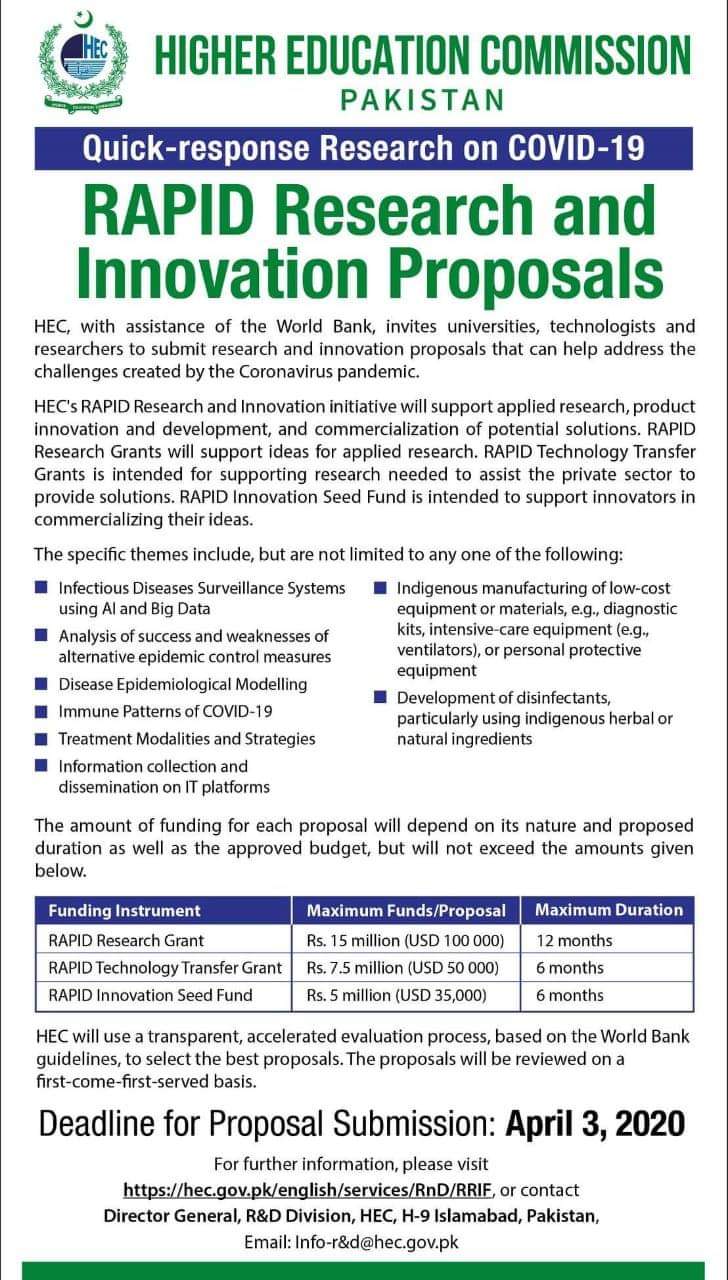
HIGHER EDUCATION COMMISSION PAKISTAN Quick-response Research on COVID-19 RAPID Research and Innovation Proposals
HEC, with assistance of the World Bank, invites universities, technologists and researchers to submit research and innovation proposals that can help address the challenges created by the Coronavirus pandemic.HEC's RAPID Research and Innovation Initiative will support applied research, product Innovation and development, and commercialization of potential solutions. RAPID Research Grants will support ideas for applied research. RAPID Technology Transfer Grants is intended for supporting research needed to assist the private sector to provide solutions. RAPID Innovation Seed Fund is intended to support innovators in commercializing their ideas.
The specific themes include, but are not limited to any one of the following:
■ Infectious Diseases Surveillance Systems Al and Big Data
■ Analysis of success and weaknesses of alternative epidemic control measures
■ Disease Epidemiological Modelling
■ Immune Patterns of COVID-19
■ Treatment Modalities and Strategies
■ Information collection and dissemination on IT platforms
■ Indigenous manufacturing of low-cost using equipment or materials, e.g., diagnostic kits, intensive care equipment (e.g., ventilators), or personal protective equipment
■ Development of disinfectants, particularly using indigenous herbal or natural ingredients
The amount of funding for each proposal will depend on its nature and proposed duration as well as the approved budget, but will not exceed the amounts given below.
RAPID Research Grant Rs. 15 million (USD 100 000) 12 months
RAPID Technology Transfer Grant Rs. 7.5 million (USD 50 000) 6 months
RAPID Innovation Seed Fund Rs. 5 million (USD 35,000) 6 months
HEC will use a transparent, accelerated evaluation process, based on the World Bank guidelines, to select the best proposals.The proposals will be reviewed on a first-come-first-served basis.
Deadline for Proposal Submission: April 3, 2020.
For further information, please visit
https://hec.gov.pk/english/services/RnD/RRIF, or contact
Director General, R&D Division, HEC, H-9 Islamabad, Pakistan,
Email: Info-r&d@hec.gov.pk
Note: I spent 8 hours continuously to write all details and understanding this about this research as first time in life for such opportunity and then I made video. I hope next time it will be a piece of cake of me.


